Label a client email in Gmail. Finalsay adds the lead to a Google Sheet, keeps a list of who needs you today and why, and, if you turn the AI on, suggests the next move. You approve each suggestion with one click. Replies are saved as drafts. Nothing is ever sent for you.
Free. Open source (MIT). No server to host and no account to create with anyone. The Sheet is the database, and it is yours.
Version 0.1. Run on two Google accounts, both mine. Nobody else has tried it yet. On 26 November 2026, on one personal Gmail account, setup, email capture, the Today list, approvals, reply drafts and the phone page worked, and the built-in self-check passed 13 of the 13 checks that applied. On 27 November 2026 I made a copy of the template Sheet in a second Google account of mine and ran CRM > Set up there: 11 checks passed, 0 failed, 4 skipped. The AI, a real iPhone or Android phone and several other parts have not been run yet. The full list is under What is tested, and what is not.
Your Sheet is the databaseFive tabs in a Google Sheet you own. No server, no new login.
AI is optionalOff by default. It suggests, you approve.
Drafts, never sentA test fails the build if any send code is added.
Free and MITOpen source, no paid tier, no telemetry.
What you get
These pictures are drawn from sample data with made-up people. They are not screenshots of Google Sheets.
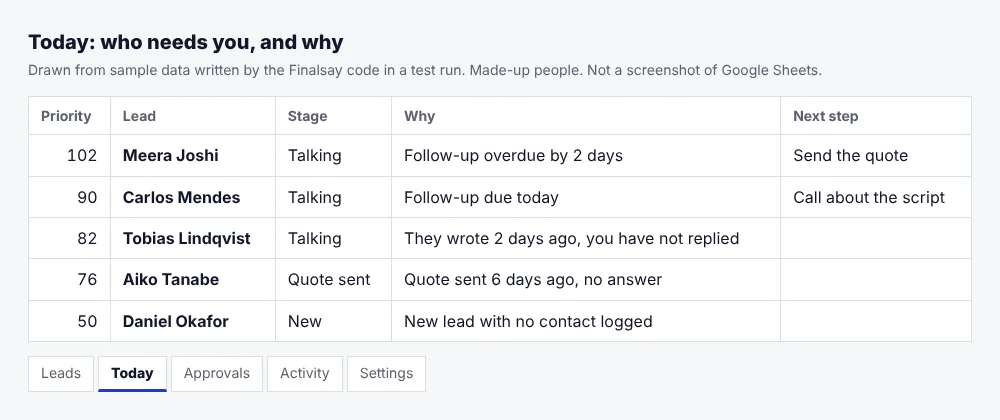
A list of who needs you today, with the reason in plain words
No AI is involved in this list. It is a handful of rules you can read in src/Core.js: follow-up overdue, due today, they wrote and you have not replied, a quote with no answer. To try the same rules on a spreadsheet you already have, use the free Follow-Up Checker. It runs in your browser.
The Today tab, drawn from sample data.
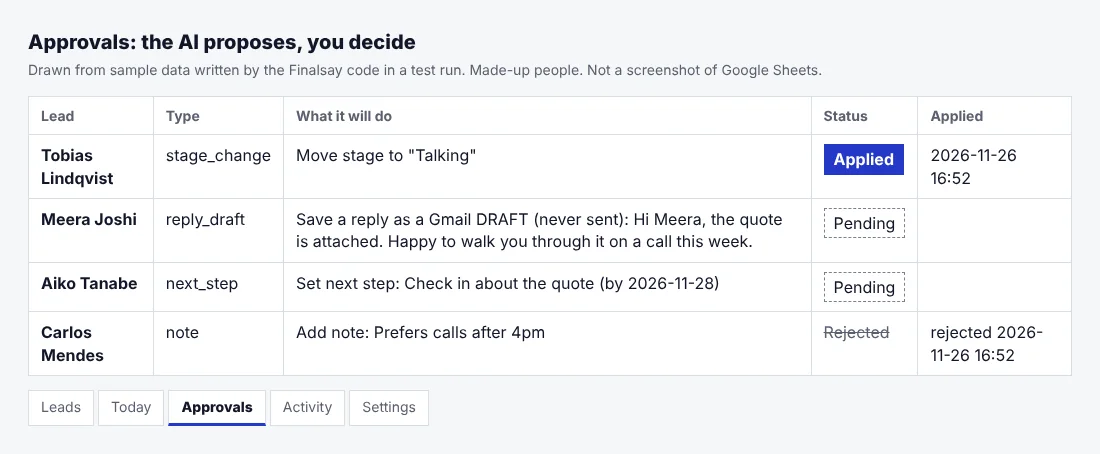
An Approvals tab: the AI proposes, you decide
Each suggestion is a row with a plain sentence under “What it will do”. Set Status to Approve or Reject. Only then does anything change, and every change is logged in the Activity tab.
The Approvals tab, drawn from sample data.
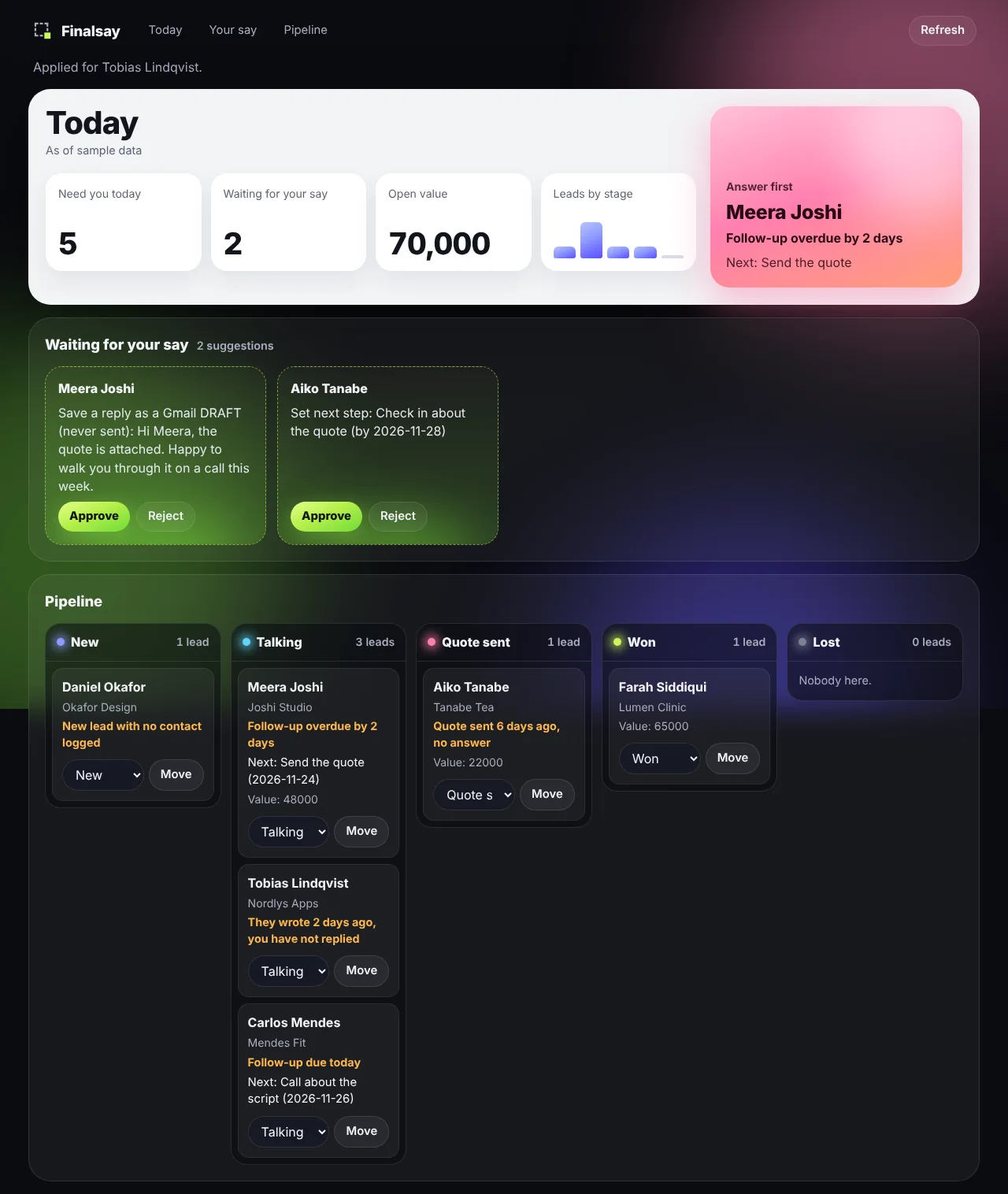
A board for the day
Today’s numbers, who to answer first, suggestions waiting for your say, and the pipeline by stage. It opens from the CRM menu in the Sheet, or from your own web address.
The board, drawn from sample data.
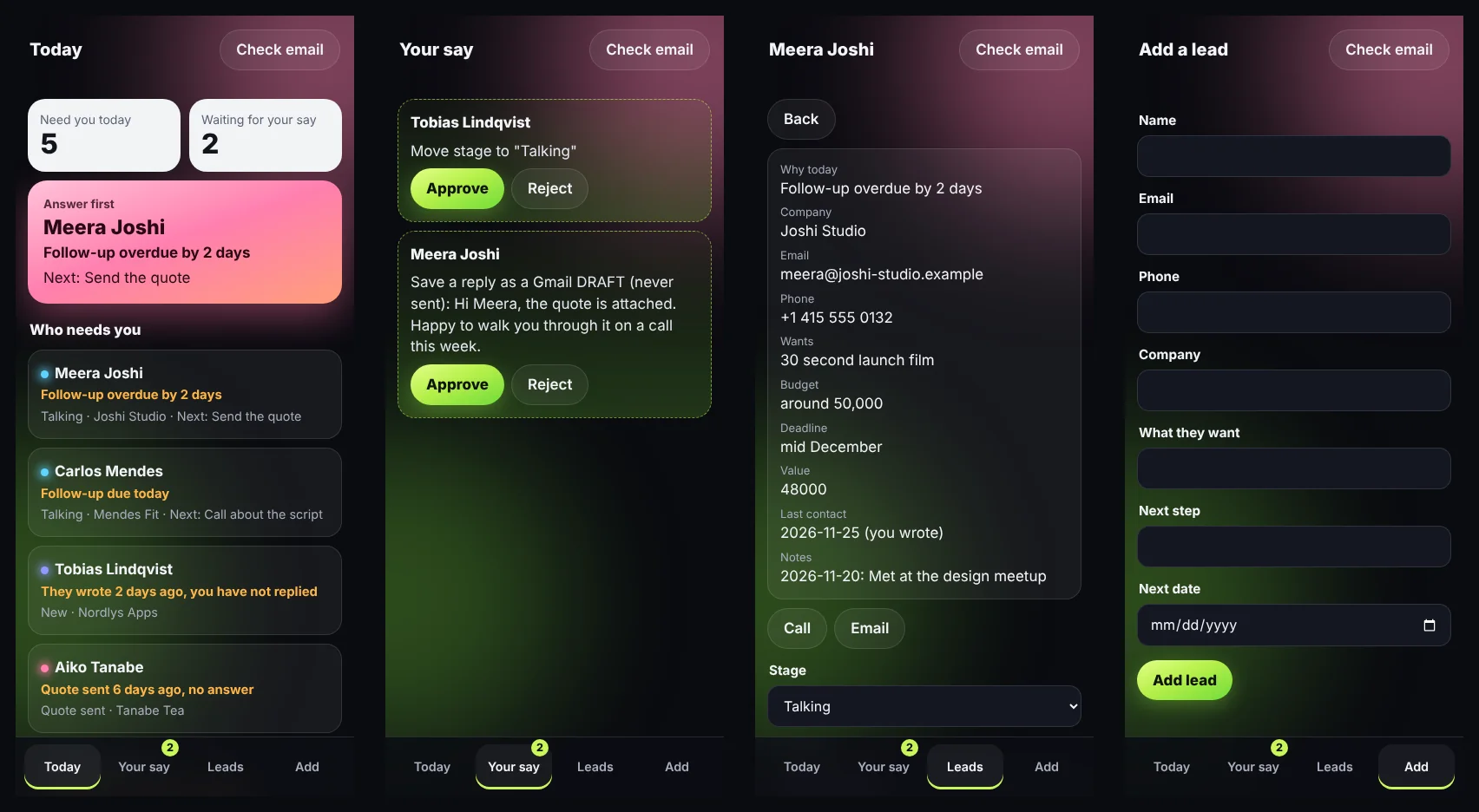
A phone page for iPhone and Android
See who needs you, approve or reject suggestions, call or email a lead, update a lead, or add one after a call. It is a web page from your own Google account that you add to your home screen, not an app from the App Store or Google Play. It has not been tried on a real phone yet. Setup is step 8 in the setup guide.
The phone page: Today, Your say, a lead, Add a lead. Sample data.
How it works
A Google Sheet is the database. Five tabs: Leads, Today, Approvals, Activity, Settings.
A Gmail label is the capture. Only threads carrying your label (default CRM) are read. The rest of your mailbox is not touched.
Apps Script is the program. It runs on Google’s side, under your own account. There is nothing to deploy for the Sheet itself.
The AI is an optional helper. Off by default. When on, it fills in empty fields (company, what they want, budget, deadline) and proposes next moves. It writes in pencil. You sign in ink.
Google Docs is for proposals. A template with placeholders becomes a proposal for the selected lead.
Gmail thread with your label
  →  Apps Script, running in your account
  →  Leads and Today tabs in your Sheet

AI suggestion (optional)  →  Approvals tab  →  you set Approve
  →  applied, or saved as a Gmail draft
What happens without a click: new lead rows, last-contact dates, the AI filling fields that are empty, and the Today list. What never happens without a click: stage changes, next steps, notes and reply drafts. What never happens at all: sending an email. No file in src/ contains a send call, and a test fails the build if one is added.
There are two modes. Simple shows five columns (Name, Email, Stage, Next Step, Next Date), so a name and a next step is already a CRM. Pro shows every column; you can add your own columns, hide or reorder them and use formulas. Finalsay finds its columns by their header text and only ever writes single cells, so your formulas are left alone.
Install
You need a Google account and a browser on a computer (not a phone) for the first setup. I have not timed it. There are two ways in: make a copy of a template Sheet that already has the script (option A), or paste the script into a blank Sheet yourself (option B).
Option A: make a copy of the template Sheet
Open the template Sheet and click Make a copy. The script comes along with the copy.
Reload your copy and wait for the CRM menu to appear. Choose CRM > Set up, then carry on from step 4 of option B below. Delete the Start here tab when you are done.
The template was made on 27 November 2026. I made a copy of it with a second Google account of mine and ran CRM > Set up there on 27 November 2026: 11 self-checks passed, 0 failed, 4 skipped (AI and calendar were off, and two checks only run from CRM > More > Run self-check). It is still my own account, so a second person has not tried it. Option B is the route that was followed on the first account.
Option B: paste the script yourself
Go to sheets.new to make a blank Sheet, then open Extensions > Apps Script.
Paste dist/Finalsay.gs (all the script files joined into one) over the contents of the Code file. Add two HTML files named Board and App from src/Board.html and src/App.html. In Project Settings, tick Show “appsscript.json” manifest file and replace its content with src/appsscript.json.
Save, then reload the Sheet. A CRM menu appears. Choose CRM > Set up.
Google shows “Google hasn’t verified this app”. That is expected: this is your own copy of a script, not a store app. Click Advanced, then Go to (your project) (unsafe), then Continue, tick Select all on the permissions list, and click Continue.
Choose CRM > Set up once more. It makes the five tabs and the Gmail label, asks once about daily automation, and then tests itself on your account.
In Gmail, put the label CRM on a client email. In the Sheet choose CRM > Capture emails now and open the Today tab.
The full guide, with every permission explained and the optional parts (AI, proposal documents, the phone page, website forms), is in SETUP.md. Steps 1 to 5 of option B and the phone page were followed on a real account on 26 November 2026.
The AI, plainly
Providers: Gemini (the default) or any OpenAI-compatible endpoint. Your key is stored in the script’s private properties, not in a cell.
When the AI is on, the text of the emails you labelled is sent to the provider you chose. Read that provider’s data terms first. This project makes no claim about what any provider does with it.
The model name in Settings is a default that may be out of date. Model names change often, so check your provider’s current list.
The AI’s answer is treated as untrusted data. Finalsay reads a fixed set of fields from it and ignores everything else, including any claim that it “did” something. Nothing it suggests is applied until you approve it.
Want nothing to leave your computer? There is an experimental page for a model running locally. It is not tested live yet.
What is tested, and what is not
Finalsay is new. The maintainer’s copy was installed and run once on one personal Gmail account, in Chrome on Windows, on 26 November 2026, and the template copy was set up once in a second account on 27 November 2026. Two runs on two of my own accounts are evidence, not proof for every account.
Seen working on my own accounts
Install, and the real order of Google’s permission screens
Set up, and the self-check: 13 passed, 0 failed, 2 skipped (AI and calendar were off)
A copy of the template Sheet in a second account of mine, then CRM > Set up: 11 passed, 0 failed, 4 skipped
Capturing a real two-message Gmail thread: one new lead, then one update
The Today list, with reasons such as “They wrote 3 days ago, you have not replied”
Approving by typing Approve in the Status cell, which applied the change within seconds
A reply draft saved inside the thread, with nothing sent
The daily and approve-on-edit triggers being created
The phone page and board in desktop Chrome: real data loaded, a lead opened, a note saved
Not run yet
A real iPhone or Android phone, and adding the page to the home screen
The AI: the Gemini request, the default model name, any other provider
The daily run firing on schedule
A person other than me trying the install, and a second person being refused by the phone page and board
The Approve and Move buttons inside the board and phone page
Threads you already replied to, HTML-only emails, send-as aliases
The website form endpoint, proposal documents from a template, “Lock down for a team”
The narrow Gmail permission path, calendar capture, the local AI page, the MCP server
The logic also passes 125 automated tests (28 for the core rules, 74 for the Apps Script files, 10 for the mail adapter, 10 checks on the files themselves and 3 for the MCP server). They run against small stand-ins for Google’s services, so they check Finalsay’s logic, not how Google behaves. The live run found three bugs, which are fixed. If something fails on your account, the Self-check tab lists each check in plain words; paste those lines into an issue.
Limits to know before you start
A Google Sheet is not a database. Finalsay is built for one person or a small team: up to a few thousand leads and a handful of editors. Past that it gets slow, and two people editing the same row can overwrite each other.
Google’s daily limits apply. On a free Gmail account, Apps Script allows 90 minutes of trigger runtime, 20,000 web requests and 20,000 email reads and writes a day, and one run may last 6 minutes (Google’s quota page, checked 26 November 2026). Finalsay stops a capture run early and continues next time.
The default Gmail permission is broad. Google offers its simple Gmail service only with the full-mailbox permission, whose consent text mentions sending and deleting. Finalsay does neither. A narrower option (read plus drafts) is included but is the least tested part.
Press CRM > Set up once and wait. Pressing it twice in quick succession can make two runs collide, and one self-check line then fails with “A sheet named Self-check already exists”. It happened to me once. A single run passed.
Five fixed stages: New, Talking, Quote sent, Won, Lost. Custom stage names are not supported in version 0.1. English only.
Anyone who can edit the Sheet is trusted. They can change any cell. Share with care.
The Sheets phone app does not run script menus. On a phone, use the phone page. It needs a connection, has no notifications, and Google shows a grey bar at the top saying a Google Apps Script user created it.
Notifications from no-reply senders are skipped, so messages that reach you only that way do not become leads.
Who it is for
You are
Fit
Solo, on a personal Gmail account
Works well
A small team on one Google Workspace domain
Works with care. Roles are Sheet sharing plus protected ranges, and everyone with edit access is trusted.
Dozens of users, tens of thousands of records, strict audit needs
Use something else.
If you can run a server and need user accounts, permissions, custom objects or many records, a self-hosted database CRM such as Twenty, Krayin or NocoBase is the better fit. Finalsay is for the person who lives in Gmail and wants their clients in a spreadsheet they already know how to use. The repository has a fuller comparison with sources in docs/COMPARISON.md.
Privacy: what leaves your Google account
When
What is sent
To whom
The AI is off (the default)
Nothing
Nobody
The AI is on, during capture
Sender, subject and up to 6,000 characters of the body of each newly captured inbound email
The AI provider you set
The AI is on, “Suggest next move”
Your name, the lead’s name and stage, and up to the last six messages of the thread
The same provider
There is no Finalsay server, no analytics and no sign-up with the author, so the author never sees your data. The phone page and the board load nothing from other sites and save nothing on your phone. The full description is in PRIVACY.md. This is not legal advice: if you handle other people’s personal data for work, you are responsible for following the laws that apply to you.
Who made it
Finalsay is by Bhavesh Vaghela, a motion designer and short-form video editor in Rajkot, India. It is MIT licensed, so you can read it, change it and share it. The name and logo have their own short terms in brand/LICENSES.md. Finalsay is an independent project and is not made, endorsed or supported by Google.
Frequently asked questions
Is Finalsay really free?
Yes. The code is MIT licensed and there is no paid tier. You may pay other companies: an AI provider if you use one beyond its free allowance, and Google if you want a Workspace plan. Finalsay itself asks for nothing.
Where is my data?
In a Google Sheet in your own Google account, plus drafts in your Gmail and proposals in your Google Docs. There is no Finalsay server and no telemetry.
Does it read all my email?
It reads only the threads you put your label on (default CRM). The permission Google makes you grant is broader than that, because Google offers its simple Gmail service only with full mailbox access. Finalsay does not send, forward or delete, and a test fails the build if code for that is added. A narrower option, read plus drafts, is included but experimental.
Will it ever send an email?
No. It can save a draft after you approve one. You open Gmail, read it and send it yourself.
Do I need the AI?
No. With the AI off you still get capture, the Today list, the board and proposal documents. The Today list uses plain rules, not AI.
What happens to my emails if I turn the AI on?
The text of each newly captured email (sender, subject and up to 6,000 characters of the body) goes to the AI provider you chose. Read that provider’s data terms first. This project makes no claim about what any provider does with it.
Does it work on my phone?
There is a phone page for iPhone and Android that you add to your home screen. It is a web page served from your own Google account, not an App Store or Google Play app. So far it has only been opened in desktop Chrome. It has not been tried on a real phone yet.
How many leads can it hold?
Up to a few thousand leads and a handful of editors. A Google Sheet is not a database. Past that, use a database CRM.
Is Finalsay a Google product?
No. It is an independent open-source project by Bhavesh Vaghela that runs inside your Google account using Google’s own scripting tool, Apps Script. It is not made, endorsed or supported by Google.
Why is it called Finalsay?
Because the AI proposes and you have the final say.
I am Bhavesh, a motion designer and short-form video editor in Rajkot, India. I make SaaS explainers, product animation and short-form ads for founders and brands.